Lab 1.4 — Deploy LLM as a Service
With all four operators running, you can now create the instances (the actual running services) and deploy Qwen3.6 as an OpenAI-compatible InferenceService. Two commands: one for the platform instances, one for the model. Then move on — the model will download while you work on the next lab.
|
Estimated time: 10 minutes active + ~15 minutes background download |
Model Serving Architecture
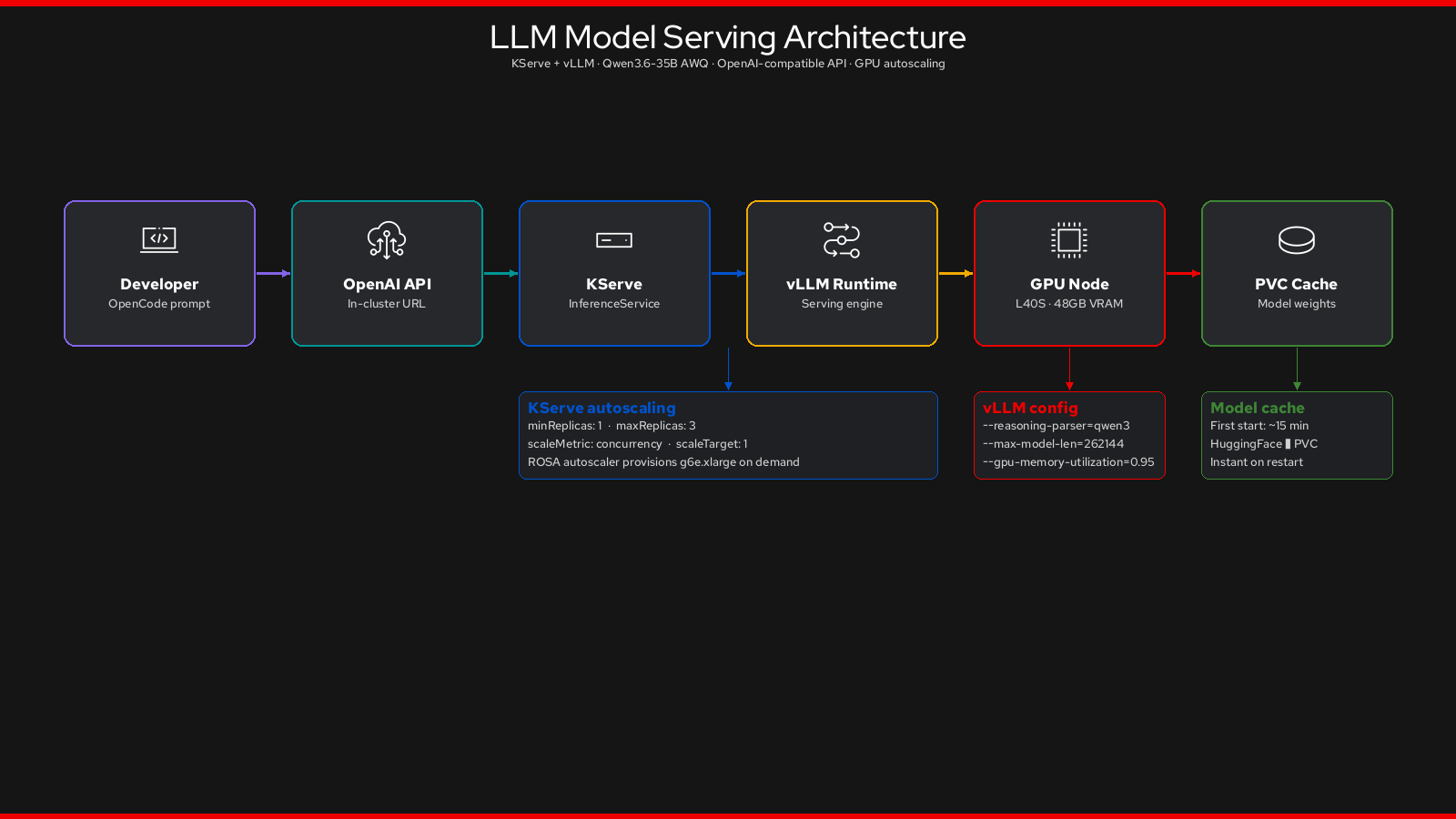
The Qwen3.6 InferenceService uses KServe to orchestrate vLLM on a dedicated GPU node, exposing an OpenAI-compatible API to every developer on the cluster.
Step 1: Create Platform Instances
This step instantiates the operator CRDs: the DataScienceCluster for RHOAI, the CheCluster for Dev Spaces, the ClusterPolicy and NodeFeatureDiscovery for GPU management, and the DCGM (GPU monitoring) dashboard.
oc apply -k deploy/instancesdatasciencecluster.datasciencecluster.opendatahub.io/default-dsc created
dscinitializatiton.dscinitialization.opendatahub.io/default-dsci created
checluster.org.eclipse.che/devspaces created
nodefeaturediscovery.nfd.openshift.io/nfd-instance created
clusterpolicy.nvidia.com/gpu-cluster-policy created
configmap/nvidia-dcgm-exporter-dashboard createdWhat Is Created
| Object | Purpose |
|---|---|
|
Enables KServe model serving (with |
|
Configures shared components: monitoring namespace, certificates, dashboard |
|
Configures Dev Spaces: user workspace namespaces, PVC per-user, inactivity timeout 1800s |
|
Starts the NFD daemon — it will label the GPU node with hardware attributes once it joins |
|
Triggers NVIDIA GPU Operator to install drivers, CUDA toolkit, and device plugin on GPU nodes |
|
Loads the NVIDIA DCGM Exporter dashboard into the OpenShift monitoring console |
Wait for Core Instances
oc wait checluster/devspaces \
  -n openshift-operators \
  --for=jsonpath='{.status.chePhase}'=Active \
  --timeout=300s

# KServe ready (Dashboard is not exposed on ROSA HCP — this is expected)
oc wait datasciencecluster/default-dsc \
  --for=jsonpath='{.status.conditions[?(@.type=="KserveReady")].status}'=True \
--timeout=300schecluster.org.eclipse.che/devspaces condition met
datasciencecluster.datasciencecluster.opendatahub.io/default-dsc condition metStep 2: Deploy the LLM InferenceService
This creates:
* The llm-serving namespace
* A 50 Gi PVC for the model weight cache
* The ServingRuntime (vLLM container configuration)
* The InferenceService itself — this triggers the first model download
oc apply -k deploy/inferencenamespace/llm-serving created
persistentvolumeclaim/qwen-model-cache created
servingruntime.serving.kserve.io/vllm-runtime created
inferenceservice.serving.kserve.io/qwen3 createdUnderstanding the InferenceService Configuration
The InferenceService is configured with a fixed single replica — sufficient for the workshop and keeps GPU costs predictable:
spec:
  predictor:
    minReplicas: 1      (1)
    maxReplicas: 1      (2)
    model:
      storageUri: "hf://cyankiwi/Qwen3.6-35B-A3B-AWQ-4bit"
      runtime: vllm-runtime
    resources:
      limits:
        nvidia.com/gpu: "1"
    tolerations:
    - key: nvidia.com/gpu  (3)
      operator: Exists
effect: NoSchedule| 1 | Always keep one replica running — no cold start during the workshop |
| 2 | Fixed at one replica — one GPU, one inference pod |
| 3 | Tolerate the GPU taint — only inference pods land on GPU nodes |
The vLLM Serving Arguments
The ServingRuntime passes key arguments to vLLM:
args:
  - --model=/mnt/models        # model weights from PVC / HuggingFace Hub
  - --served-model-name={{.Name}}  # exposed as "qwen3" via the API
  - --dtype=half               # FP16 for A-series GPU compatibility
  - --max-model-len=40960      # token context window
  - --gpu-memory-utilization=0.95  # use 95% of GPU VRAM
First Start: Model Download
The first time the predictor pod starts, it downloads model weights from HuggingFace Hub to the PVC. This takes approximately 10-15 minutes.
# Watch the download progress (run in background, move on)
oc logs -f -n llm-serving \
  $(oc get pod -n llm-serving -l serving.kserve.io/inferenceservice=qwen3 \
    -o name 2>/dev/null | head -1) 2>/dev/null &
echo "Model download logs streaming in background. Move on to Lab 5."|
Subsequent starts are instant. The weights are cached on the PVC ( |
Verify the Endpoint Will Be Available
oc get inferenceservice -n llm-servingNAME URL READY PREV LATEST AGE
qwen3 http://qwen3-predictor.llm-serving.svc.cluster.local False 0 100 2mThe READY column shows False while the model loads. It will become True when the predictor is serving requests. You will verify this at the end of Lab 5.
Summary
You have now triggered the deployment of:
-
✅
DataScienceCluster— RHOAI model serving enabled -
✅
CheCluster— Dev Spaces ready for developer workspaces -
✅
InferenceService/qwen3— Qwen3 downloading, will be OpenAI-compatible when ready -
✅ NVIDIA GPU monitoring dashboard — auto-loaded into OpenShift console
➡️ Move immediately to Lab 5: Define Developer Conventions. Check the InferenceService status at the end of that lab.