Lab 1.5 — Explore the Developer Template
The template repository is already initialized and published on GitHub at fjcloud/go-app-template. Your role as Platform Engineer is to understand what it contains, why each file is there, and how to adapt the key parameters to your cluster before sharing the launch URL with developers.
|
Estimated time: 15 minutes |
What is in the template?
git clone https://github.com/fjcloud/go-app-template
cd go-app-template
ls -la
You should see:
AGENTS.md          ← platform conventions read by OpenCode
opencode.json      ← LLM configuration (model, URL, timeouts)
devfile.yaml       ← workspace definition (tooling + one-click tasks)
deploy/base/       ← Kustomize: Deployment, Service, Route
pipeline/base/     ← Kustomize: Tekton Pipeline + PVC
gitops/base/       ← Kustomize: developer-owned ArgoCD instance
scripts/
  git-push.yml     ← Ansible: push code to personal Git repo
  build-image.yml  ← Ansible: Tekton PipelineRun (git-clone + buildah)
  gitops-deploy.yml← Ansible: ArgoCD instance + Application sync
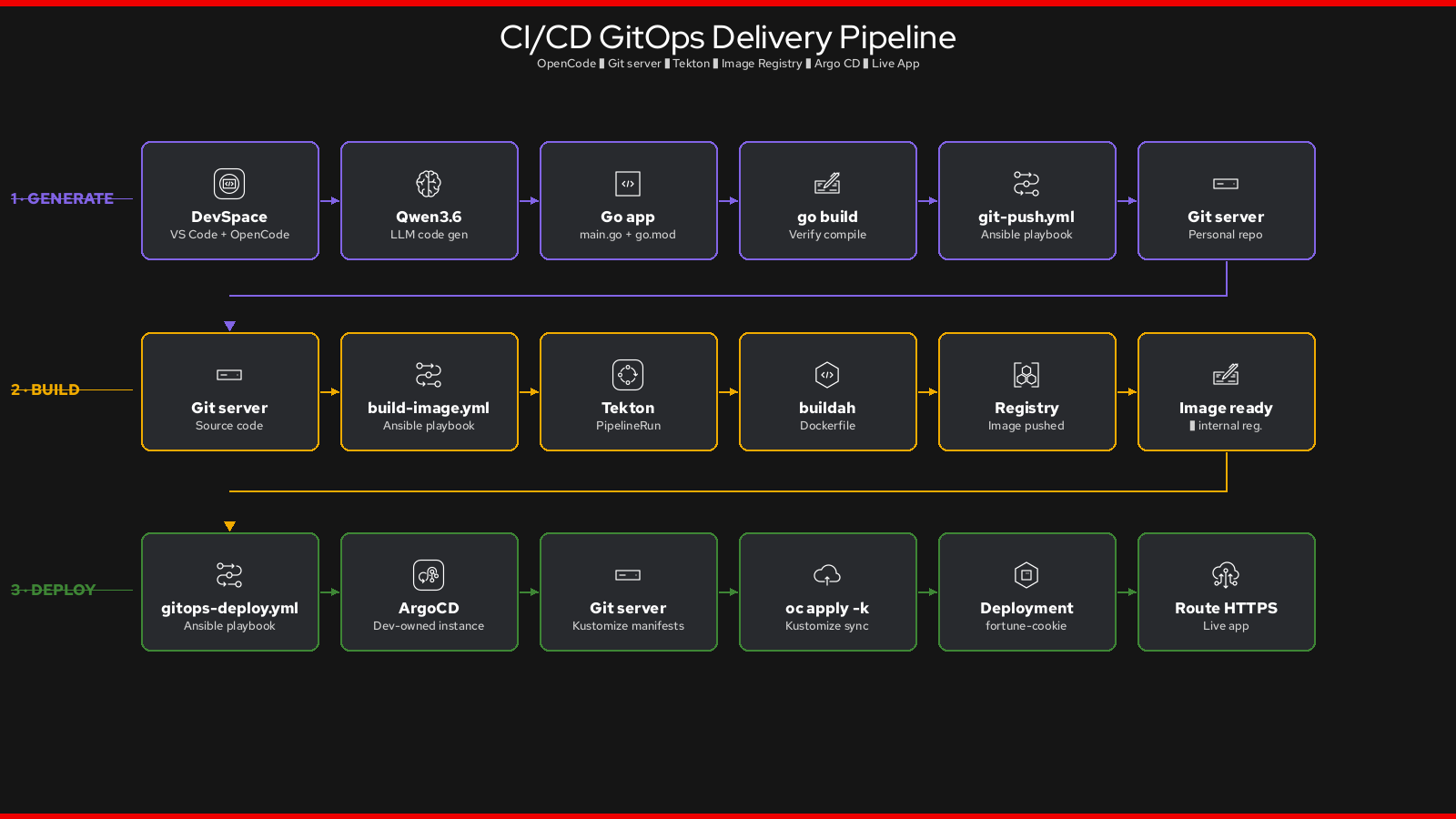
The key boundary:
-
OpenCode generates code (
main.go,go.mod,Dockerfile) guided byAGENTS.md -
The Ansible playbooks handle all platform operations — each task is named and readable
-
Kustomize manifests are applied by the playbooks via
oc apply -k
Step 1: Read AGENTS.md
AGENTS.md is the file OpenCode reads before every session. It defines what the LLM
must generate, what already exists, and how to trigger the deploy pipeline.
cat AGENTS.mdRead through it carefully. Notice:
-
Files YOU must generate —
main.go,go.mod,Dockerfilewith an exact two-stage template -
Files already in the repository — the LLM must NOT touch
deploy/,pipeline/,gitops/,scripts/ -
Build verification — the LLM compiles the binary before calling any playbook
-
Deploy workflow — three
ansible-playbookcalls, in order, with named tasks
|
The Dockerfile template in |
Step 2: Understand the Ansible playbooks
Open each playbook and read the task names — they read like a runbook:
cat scripts/git-push.ymltasks:
- name: Remove existing origin remote
- name: Create repository on Git server
- name: Configure git identity
- name: Stage all files
- name: Commit if there are staged changes
- name: Push to Git server
- name: Get repository URL
- name: Print resultcat scripts/build-image.ymltasks:
- name: Get repository URL
- name: Create build project
- name: Grant pipeline service account registry-editor role
- name: Apply Tekton Pipeline and workspace PVC
- name: Trigger PipelineRun
- name: Wait for PipelineRun to succeed (up to 15 min)
- name: Assert PipelineRun succeeded
- name: Print built image referencecat scripts/gitops-deploy.ymltasks:
- name: Get repository URL
- name: Create dev project
- name: Allow dev namespace to pull images from build namespace
- name: Update image reference in deployment manifest
- name: Commit and push updated manifest
- name: Deploy developer-owned Argo CD instance
- name: Wait for Argo CD instance to become Available
- name: Create Argo CD Application
- name: Wait for application to sync and become Healthy
- name: Show application URLs|
The Argo CD instance in |
Step 3: Inspect the Kustomize manifests
# Tekton build pipeline
cat pipeline/base/pipeline.yaml

# ArgoCD instance
cat gitops/base/argocd.yaml

# Application placeholder (image: updated by gitops-deploy.yml at runtime)
cat deploy/base/deployment.yaml
The deploy/base/deployment.yaml uses image: placeholder — the gitops-deploy.yml playbook
replaces that value with the actual image pushed by Tekton before Argo CD syncs.
Step 4: Adapt opencode.json for your cluster
The opencode.json points at the in-cluster LLM service.
Update the baseURL to match your cluster’s inference endpoint:
cat opencode.jsonThe relevant field:
"baseURL": "http://qwen3-predictor.llm-serving.svc.cluster.local:8080/v1"If your InferenceService or namespace name differs, update this value and push:
# Get the actual service hostname
oc get inferenceservice -n llm-serving

# If it matches the default, no change needed. Otherwise:
# sed -i 's|qwen3-predictor|<your-service-name>|g' opencode.json
# git add opencode.json && git commit -m "fix: update LLM endpoint" && git push
Step 5: Adapt devfile.yaml — set your GIT_SERVER
The devfile.yaml has one value to update: the GIT_SERVER environment variable.
This is the URL of the in-cluster Git server where developers will push their application repos.
cat devfile.yaml | grep GIT_SERVERExpected output:
        - name: GIT_SERVER
          value: https://gitpop.apps.sno.msl.cloud
Get your cluster’s Git server URL and update the devfile:
GIT_SERVER=https://$(oc get route gitpop -n gitpop \
  -o jsonpath='{.spec.host}')

echo "Git server: $GIT_SERVER"

sed -i "s|https://gitpop.apps.sno.msl.cloud|${GIT_SERVER}|g" devfile.yaml
Commit and push the change to your fork:
git add devfile.yaml opencode.json
git commit -m "fix: adapt endpoints for workshop cluster"
git push|
If you are using the shared workshop cluster with the pre-configured defaults, the values already match and no push is required. Share the DevSpaces URL directly from Step 6. |
Step 6: Share the developer launch URL
Developers open a single URL to get a fully configured workspace. Construct it from your Dev Spaces instance and the template repository:
DEVSPACES_URL=$(oc get checluster devspaces -n openshift-devspaces \
  -o jsonpath='{.status.cheURL}')

TEMPLATE_URL="https://github.com/fjcloud/go-app-template"

echo "============================================"
echo " Participant workspace URL:"
echo "  $DEVSPACES_URL/#$TEMPLATE_URL"
echo "============================================"
When a developer opens that URL, Dev Spaces:
-
Clones the template repository
-
Starts the
bootstrapcommand — installs OpenCode, gitpop, and Ansible -
Opens a VS Code workspace with the three deploy tasks visible in the sidebar (rocket icon)
|
The Tasks panel in DevSpaces (sidebar → rocket icon) shows all
OpenCode generates the app. The developer triggers the tasks in order to ship it. |
Module 200 Complete
As the Platform Engineer, you have deployed and configured the full developer platform:
| Component | Status |
|---|---|
GPU Machine Pool (fixed, 1 node) |
✅ Provisioned in ROSA |
OpenShift AI + NVIDIA GPU Operator + NFD + Dev Spaces |
✅ All operators running |
OpenShift GitOps (Argo CD) + OpenShift Pipelines (Tekton) |
✅ Installed via gitops-catalog |
Qwen3.6 InferenceService |
✅ Ready, OpenAI-compatible API available in-cluster |
Go app template |
✅ Explored and adapted; developer DevSpaces URL ready to share |
Switch persona — move on to Module 300: Developer Experience.