AI-Powered Developer Platform on ROSA
Welcome to the AI-Powered Developer Platform on ROSA workshop. In this half-day hands-on lab, you will learn how Red Hat OpenShift Service on AWS (ROSA) provides the perfect foundation for modern, AI-assisted software delivery — from running GPU-backed Large Language Models as a managed service, to giving every developer an intelligent cloud IDE that generates, deploys, and audits their applications automatically.
Who This Workshop Is For
This workshop is designed for two complementary personas that will work through the labs together:
| Persona | Role in This Workshop |
|---|---|
Platform Engineer |
Deploys ROSA infrastructure, provisions scalable GPU capacity, deploys an LLM as a Service using OpenShift AI, and sets the developer platform conventions — all without writing a runbook. |
Developer |
Launches a cloud IDE (OpenShift Dev Spaces), uses an AI coding assistant (OpenCode) backed by the in-cluster LLM, generates and deploys a real application, then validates it against platform rules — all without leaving the browser. |
What You Will Build
By the end of this workshop, you will have deployed a complete AI developer platform on ROSA and shipped a real application through it:
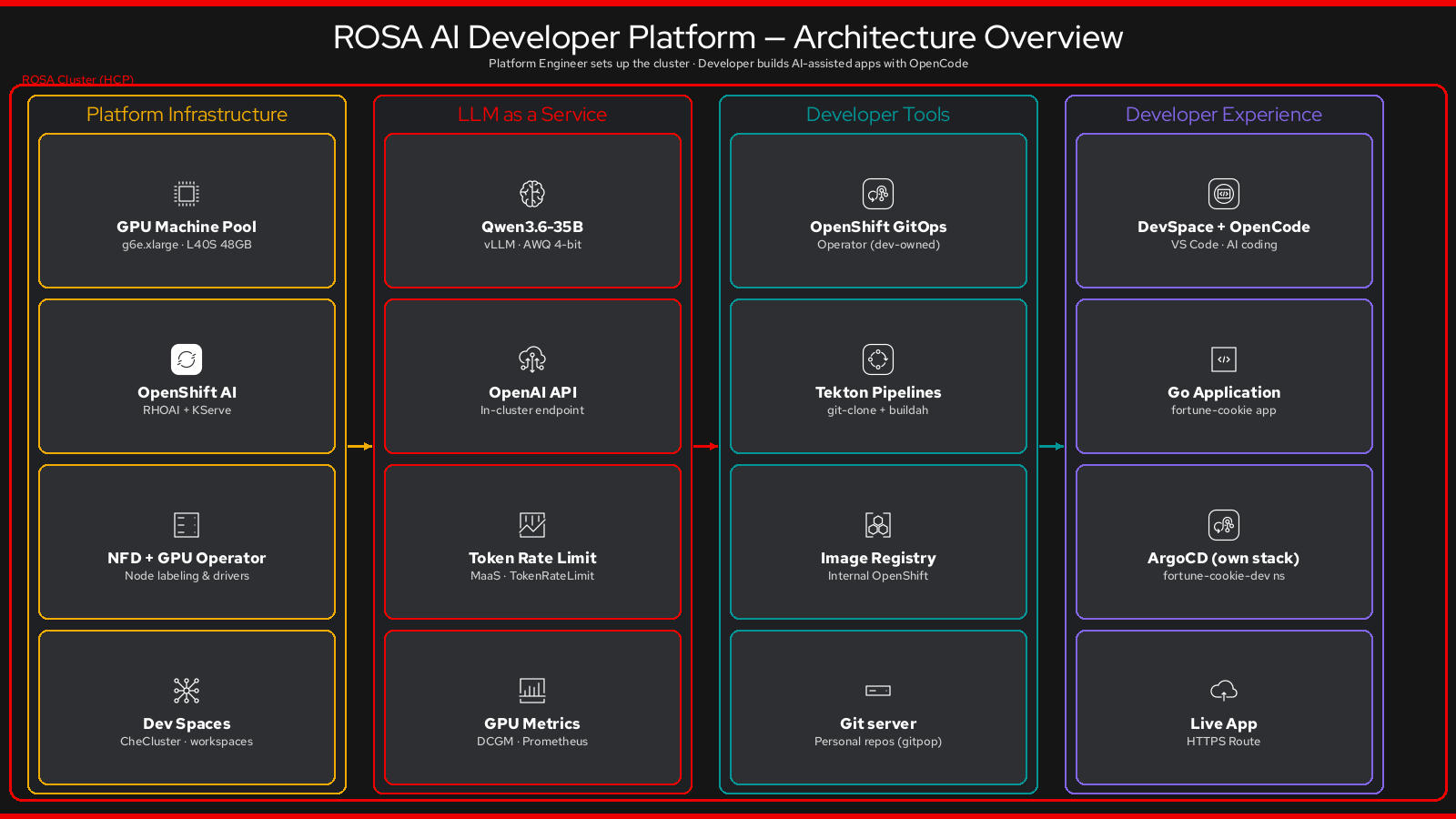
Platform Engineer Track
-
A fixed-size GPU machine pool on ROSA — one GPU node, no manual EC2 interaction
-
OpenShift AI (RHOAI) with KServe serving Qwen3.6-35B (a state-of-the-art MoE reasoning model) via a fully OpenAI-compatible REST API
-
OpenShift Dev Spaces — a browser-based cloud IDE pre-configured for every developer
-
AGENTS.md — a machine-readable rulebook that makes OpenCode enforce your platform conventions automatically
-
A Go application template — the "golden template" developers clone to start new projects
-
OpenShift GitOps (Argo CD) and OpenShift Pipelines (Tekton) — GitOps delivery infrastructure, ready for teams
Developer Track
-
A personal Git repository — provisioned in seconds via the Git server, no GitHub account needed
-
A complete Fortune Cookie application generated live by OpenCode + Qwen3.6: Go binary, web UI, Kustomize manifests
-
The app built and deployed automatically via OpenShift Pipelines and Argo CD
-
Platform compliance validated — and auto-fixed — by the same LLM that wrote the code
Learning Outcomes
After completing this workshop, you will understand:
-
How ROSA’s managed machine pools give you on-demand GPU capacity without EC2 complexity
-
How OpenShift AI (KServe + vLLM) provides a scalable, OpenAI-compatible LLM API on your own cluster
-
How
AGENTS.mdshifts platform governance from documentation to code -
How OpenShift Dev Spaces + OpenCode creates an AI-augmented developer experience that requires no local setup
-
How OpenShift Pipelines and Argo CD form a complete GitOps delivery pipeline from a single repository
-
How to measure and govern LLM usage with NVIDIA DCGM dashboards and OpenShift AI model metrics
Workshop Structure
| Module | Lab | Topic | Duration |
|---|---|---|---|
0 — Setup |
— |
Access your ROSA cluster, set up CLI credentials |
20 min |
1 — Platform Engineer |
1.1 |
Deploy a GPU Machine Pool |
|
15 min |
1.2 |
||
Install Platform Operators |
5 min active / ~20 min background |
||
1.3 |
Discover OpenShift AI |
||
15 min |
1.4 |
Deploy LLM as a Service (Qwen3.6) |
|
10 min active / ~15 min background |
1.5 |
Explore the Developer Template |
15 min |
2 — Developer |
2.1 |
Launch Your Dev Space |
10 min |
2.2 |
Build and Deploy with OpenCode |
20 min |
|
2.3 |
Ship It: Change → Build → Deploy |
15 min |
|
2.4 |
Validate Best Practices with OpenCode |
10 min |
|
3 — Observability |
— |
LLM Metrics & GPU Dashboards (optional) |
20 min |
— |
— |
Conclusion & Q&A |
10 min |
|
Fire-and-forget timing: Long operations (GPU node provisioning, operator installation, model download) are triggered early and run in the background while you work on other labs. By the time you need the LLM, it will be ready. |
Prerequisites
You will need:
-
A web browser
-
Access to the lab environment (credentials provided by your instructor)
-
A terminal — provided inside your Dev Space (no local install required)
Everything else — rosa, oc, kubectl, the OpenCode CLI, the Git server client — is either pre-installed in the lab environment or installed during the workshop steps.
Let’s get started!