Lab 1.3 — Publish Qwen3.8 as a Service
Operators are still installing. Understand why Models-as-a-Service, wait until the operators are Ready, then apply the serving stack. Developers get one HTTPS front door and one sk-oai- key — not a raw predictor Service, and not api.openai.com.
|
Estimated time: 15 minutes active + model load in the background |
Why Models-as-a-Service
OpenShift AI 3.5 serves the model as an LLMInferenceService. Models-as-a-Service sits in front: Gateway, API keys, token quota. GitOps still owns the serving stack. The dashboard is the UI for catalog, subscriptions, and extra keys.
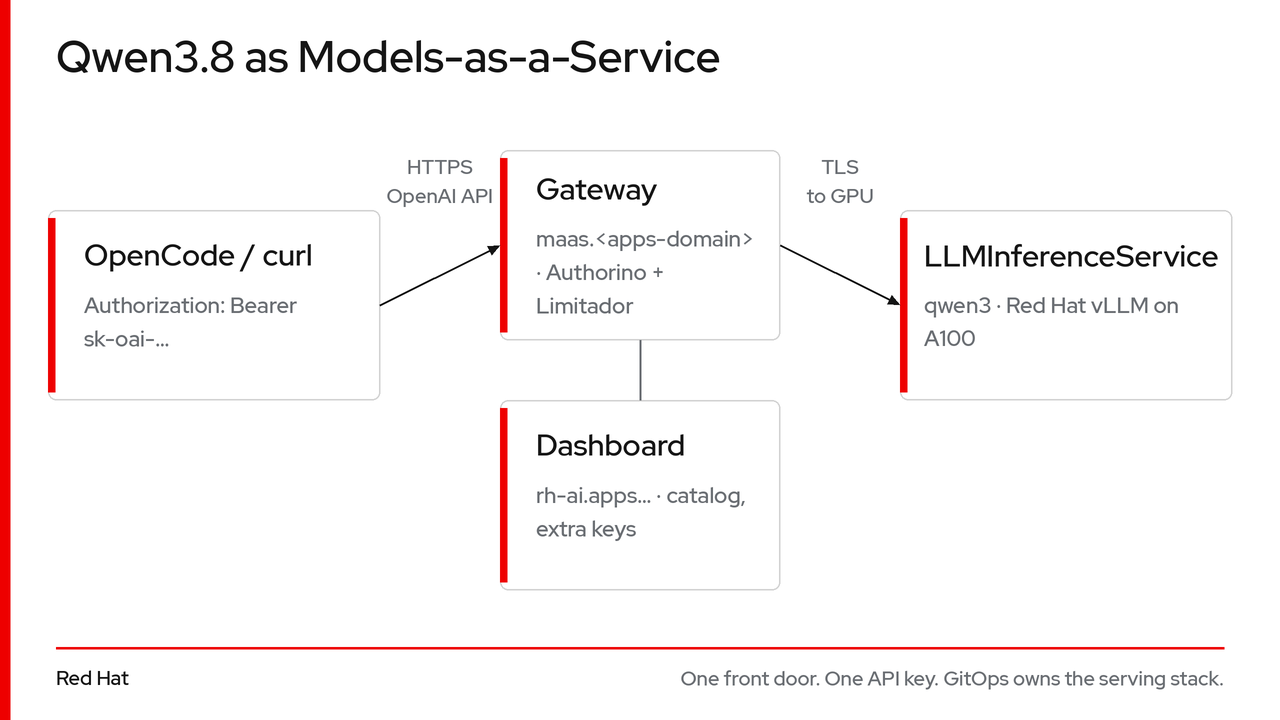
Anything that already speaks OpenAI works. One key, not an access/secret pair. Do not install Service Mesh 3 — OpenShift 4.22 already has Gateway API.
| Compared with a plain Deployment | What MaaS adds |
|---|---|
You wire GPU tolerations and a Route yourself |
Same placement, plus KServe TLS, shm, probes, HTTPRoute on |
No auth |
|
Generic CPU/memory metrics |
vLLM tokens/s + consumption per key |
Qwen3.8 on this GPU
| Property | Value |
|---|---|
Checkpoint |
|
Engine |
Red Hat vLLM CUDA 3.5.0 — |
Context |
Native 262,144 ( |
API id / display name |
|
Tools / reasoning |
|
OpenCode needs --enable-auto-tool-choice. limit.output: 32768 matches OpenCode’s default and stays well below the 262,144 window.
Same JSON as cloud OpenAI, different host:
curl https://maas.<apps-domain>/llm-serving/qwen3/v1/chat/completions \
  -H "Authorization: Bearer $OPENAI_API_KEY" \
  -d '{"model": "qwen3", "messages": [{"role": "user", "content": "Hello"}]}'
✅ Checkpoint: Operators Ready
Lab 1.2 is still running in the background. Wait here before you apply instances. Re-apply operators first so the Tekton git-clone and buildah tasks land after the CRDs exist. oc wait only works after each Deployment exists.
oc apply -k deploy/operators

wait_deploy() {
  local ns=$1 dep=$2
  until oc get deploy/"$dep" -n "$ns" >/dev/null 2>&1; do sleep 5; done
  oc wait deploy/"$dep" -n "$ns" --for=condition=Available --timeout=600s
}

wait_deploy openshift-operators devspaces-operator
wait_deploy openshift-nfd nfd-controller-manager
wait_deploy nvidia-gpu-operator gpu-operator
wait_deploy redhat-ods-operator rhods-operator
wait_deploy kuadrant-system kuadrant-operator-controller-manager
wait_deploy openshift-lws-operator openshift-lws-operator
wait_deploy cert-manager cert-managerdeployment.apps/devspaces-operator condition met
deployment.apps/nfd-controller-manager condition met
deployment.apps/gpu-operator condition met
deployment.apps/rhods-operator condition met
deployment.apps/kuadrant-operator-controller-manager condition met
deployment.apps/openshift-lws-operator condition met
deployment.apps/cert-manager condition met|
If any |
Step 1: Create Platform Instances
This instantiates the serving control plane, Dev Spaces, GPU policies, and the MaaS gateway. One apply, then one configure script (LeaderWorkerSet to one replica so Dev Spaces has CPU, Authorino TLS, bind the Gateway to this cluster’s apps domain and wildcard cert, recycle Kuadrant after Gateway API CRDs exist, dashboard GPU taints and MaaS UI flags).
oc apply -k deploy/instances
bash deploy/instances/configure-platform.shdatasciencecluster.datasciencecluster.opendatahub.io/default-dsc created
checluster.org.eclipse.che/devspaces created
gateway.gateway.networking.k8s.io/maas-default-gateway created
kuadrant.kuadrant.io/kuadrant created
LeaderWorkerSet manager scaled to 1 (CPU headroom for Dev Spaces).
Authorino TLS configured.
MaaS Gateway bound to this cluster.
Kuadrant operator recycled after Gateway API CRDs.
Dashboard GPU-node tolerations and MaaS UI flags applied.
Platform instances configured (LWS CPU + Authorino TLS + MaaS Gateway + Kuadrant + dashboard).|
Kuadrant registers Istio reconcilers only if the |
What was created
| Object | Purpose |
|---|---|
|
Turns on KServe, MaaS, the dashboard, and OGX (Gen AI studio). |
|
One HTTPS front door: |
|
API-key auth (Authorino) and token quota (Limitador). Postgres is POC-only. |
|
Dev Spaces workspaces pointed at MaaS. The key is minted in Step 3. |
|
GPU labels, drivers, device plugin. |
Wait for MaaS
chePhase stays empty until the Dev Spaces gateway is scheduled. On a 3-worker cluster that can take several minutes. Wait until each object exists, then wait for Ready (15 minutes).
until oc get checluster/devspaces -n openshift-operators >/dev/null 2>&1; do sleep 5; done
oc wait checluster/devspaces \
  -n openshift-operators \
  --for=jsonpath='{.status.chePhase}'=Active \
  --timeout=900s

until oc get datasciencecluster/default-dsc >/dev/null 2>&1; do sleep 5; done
oc wait datasciencecluster/default-dsc \
  --for=jsonpath='{.status.conditions[?(@.type=="ModelsAsAServiceReady")].status}'=True \
  --timeout=900s

oc wait datasciencecluster/default-dsc \
  --for=jsonpath='{.status.conditions[?(@.type=="DashboardReady")].status}'=True \
  --timeout=900s

until oc get maastenantconfig/default-tenant -n models-as-a-service >/dev/null 2>&1; do sleep 5; done
oc wait maastenantconfig/default-tenant \
  -n models-as-a-service \
  --for=jsonpath='{.status.conditions[?(@.type=="Ready")].status}'=True \
--timeout=900schecluster.org.eclipse.che/devspaces condition met
datasciencecluster.datasciencecluster.opendatahub.io/default-dsc condition met
datasciencecluster.datasciencecluster.opendatahub.io/default-dsc condition met
maastenantconfig.maas.opendatahub.io/default-tenant condition metDashboard: https://rh-ai.apps.<apps-domain>/ (also Red Hat OpenShift AI in the OpenShift Application launcher). Log in with cluster-admin. Catalog and extra keys live under Gen AI / Models-as-a-Service. Dev Spaces still needs the key in Secret ai-provider-openai-api-key — that is Step 3, not the dashboard.
Step 2: Publish Qwen3.8 to MaaS
This creates:
-
The
llm-servingnamespace and 50 Gi model-cache PVC -
LLMInferenceService/qwen3— Red Hat vLLM CUDA 3.5.0 on the GPU node, attached tomaas-default-gateway -
MaaSModelRef(catalog),MaaSAuthPolicy(who can call it),MaaSSubscription(token quota)
Wait until the GPU node is Ready, then apply:
until oc get node -l node.kubernetes.io/instance-type=Standard_NC24ads_A100_v4 \
    --no-headers 2>/dev/null | grep -q .; do
  sleep 10
done
oc wait node -l node.kubernetes.io/instance-type=Standard_NC24ads_A100_v4 \
  --for=condition=Ready --timeout=900s

oc apply -k deploy/inferencenamespace/llm-serving created
persistentvolumeclaim/qwen-model-cache created
llminferenceservice.serving.kserve.io/qwen3 created
maasmodelref.maas.opendatahub.io/qwen3 created
maasauthpolicy.maas.opendatahub.io/qwen3-access created
maassubscription.maas.opendatahub.io/qwen3-workshop createdThe LLMInferenceService (after the apply)
spec:
  replicas: 1
  model:
    uri: hf://RedHatAI/Qwen3.8-27B-INT4
    name: qwen3                          (1)
  storageInitializer:
    enabled: false                       (2)
  router:
    gateway:
      refs:
        - name: maas-default-gateway     (3)
          namespace: openshift-ingress
  template:
    containers:
      - name: main
        image: registry.redhat.io/rhaii/vllm-cuda-rhel9:3.5.0
        args:
          - --served-model-name=qwen3
          - --max-model-len=262144
- --ssl-certfile=/var/run/kserve/tls/tls.crt (4)| 1 | API model id stays qwen3; the display name is Qwen3.8 |
| 2 | Weights already live on PVC qwen-model-cache (HF_HOME=/opt/models). Skip the storage-initializer re-download. |
| 3 | Required for MaaS: the HTTPRoute attaches to maas-default-gateway |
| 4 | OpenShift AI 3.5 enables backend TLS by default; vLLM must present the KServe service-CA cert |
The image is Red Hat AI Inference CUDA (rhaii/vllm-cuda-rhel9:3.5.0) — not community vllm/vllm-openai.
Let the model load in the background
A cold cluster downloads ~18 GiB from Hugging Face into PVC qwen-model-cache (HF_HOME=/opt/models). If that cache is empty, first Ready can take 10–20 minutes. If weights are already on the PVC, vLLM mainly loads them into GPU memory (~5–8 minutes). Wait in the background for 20 minutes so a cold pull can finish:
until oc get llminferenceservice/qwen3 -n llm-serving >/dev/null 2>&1; do sleep 5; done
oc wait llminferenceservice/qwen3 -n llm-serving \
  --for=jsonpath='{.status.conditions[?(@.type=="Ready")].status}'=True \
  --timeout=1200s &
echo "Model wait started in background (PID $!)"
Step 3: Mint the workshop API key
Inference uses one sk-oai- Bearer token (not an access key + secret). The script mints a key bound to qwen3-workshop (5 000 000 tokens / 24h) and stores it as OPENAI_API_KEY for every Dev Spaces workspace.
bash deploy/inference/mint-workshop-key.shYou have now:
-
Dashboard —
https://rh-ai.apps.<apps-domain>/ -
Gateway —
https://maas.<apps-domain>/ -
LLMInferenceService/qwen3loading on the GPU -
Catalog, access, quota (
MaaSModelRef/MaaSAuthPolicy/MaaSSubscription) -
One
sk-oai-key in Secretai-provider-openai-api-key
Lab 2.1 smoke-tests the same URL OpenCode will call. Extra keys for curl can also be created in the dashboard; they do not replace this Secret.
➡️ Move to Lab 1.4: Hand the Keys. Developers call MaaS; they never talk to the predictor Service.