AI-Powered Developer Platform on ARO
Welcome to the AI-Powered Developer Platform on ARO workshop.
The story for today is a Monday at a company that will not send source code to a public LLM. This morning the platform team publishes Qwen3.8. This afternoon a developer ships an app with it. You wear both hats, then you look at the GPU and token bill.
Who This Workshop Is For
| Persona | Role in This Workshop |
|---|---|
Platform Engineer (morning) |
Provisions GPU capacity, installs operators, publishes Qwen3.8 behind a governed OpenAI-compatible API, and hands developers a short |
Developer (afternoon) |
Launches OpenShift Dev Spaces, talks to OpenCode backed by that in-cluster LLM, ships a real app through Tekton and Argo CD, then asks the same model to audit the manifests. |
What You Will Build
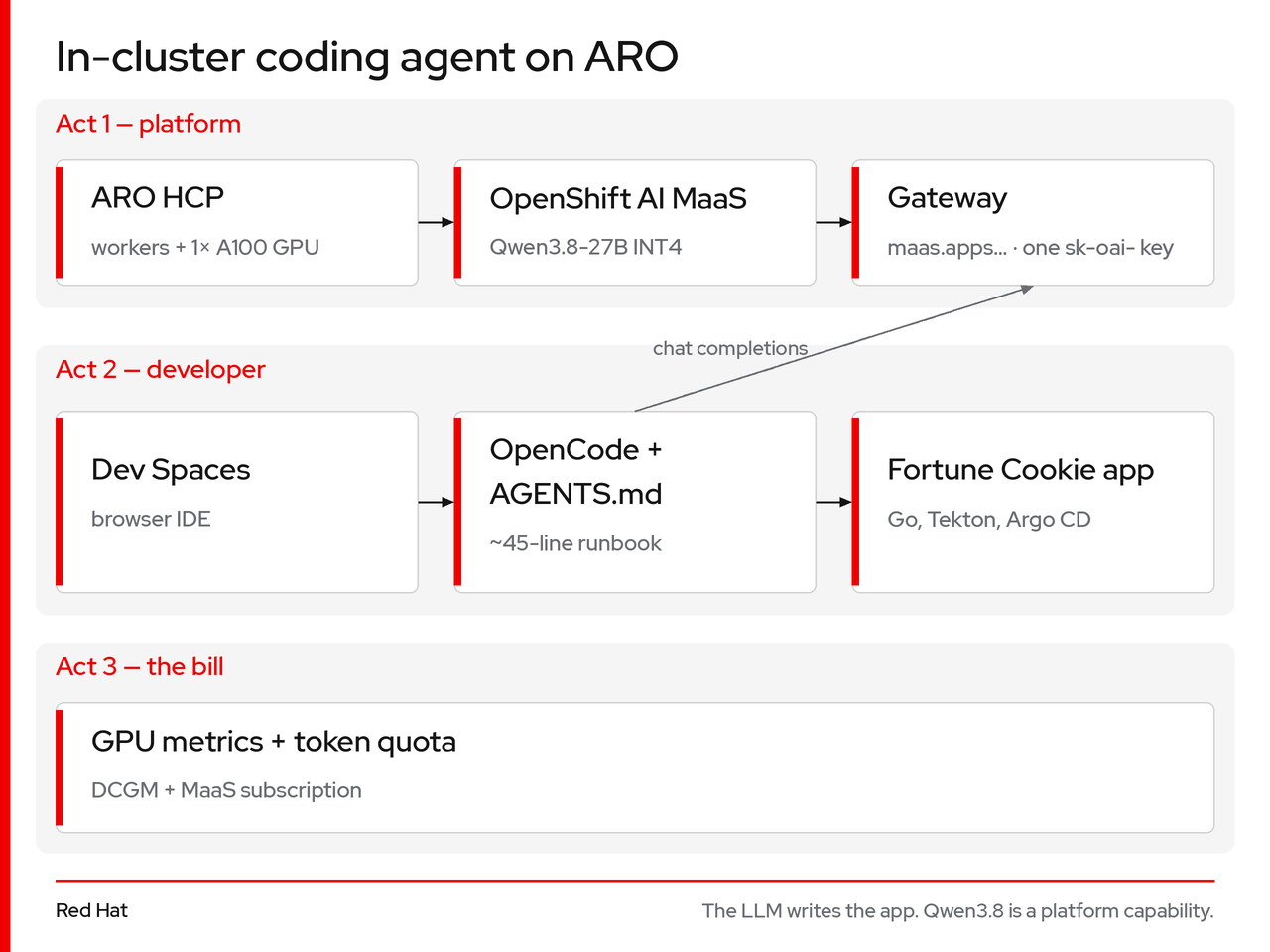
The LLM writes the app. Qwen3.8 is a platform capability.
Act 1 — Platform
-
A fixed-size GPU node pool on ARO HCP — one NVIDIA A100 80 GB, no virtual machines built by hand
-
OpenShift AI Models-as-a-Service serving Qwen3.8-27B (Red Hat AI INT4) behind one HTTPS front door and one
sk-oai-key -
OpenShift Dev Spaces pointed at that gateway
-
AGENTS.md — the only runbook OpenCode reads
-
OpenShift GitOps (Argo CD) and OpenShift Pipelines (Tekton)
Act 2 — Developer
-
A personal Git repository on ephemeral Git (workshop-scoped, no GitHub account)
-
A Fortune Cookie Go app generated live by OpenCode + Qwen3.8
-
Image build and GitOps deploy from git, ephemeral Git, and
oc— no Ansible, no local Docker -
Platform rules (limits, probes, SCC, TLS) audited by the same model
Learning Outcomes
After completing this workshop, you will understand:
-
How an ARO HCP node pool gives you GPU capacity without building Azure VMs by hand
-
How OpenShift AI (
LLMInferenceService+ Models-as-a-Service) is a governed OpenAI-compatible API on your cluster -
How
AGENTS.mdshifts platform governance from documentation to something the model enforces -
How Dev Spaces + OpenCode is an AI-augmented inner loop with no laptop install
-
How Tekton and Argo CD form a GitOps path from a single repository
-
How GPU watts and token windows are the real cost of an in-cluster coding agent
Workshop Structure
| Act | Lab | Topic | Duration |
|---|---|---|---|
0 — Get in |
— |
Deploy the ARO HCP cluster and log in with |
45 min |
1 — Stand up the agent |
1.1 |
Deploy a GPU Node Pool |
15 min (5 active) |
1.2 |
Install Platform Operators |
5 min active / ~20 min background |
|
1.3 |
Publish Qwen3.8 as a Service |
15 min active / model loads in background |
|
1.4 |
Hand the Keys ( |
10 min |
|
2 — First day |
2.1 |
Launch Your Dev Space |
10 min |
2.2 |
Prompt to Production (generate, ship, change) |
35 min |
|
2.3 |
Audit with OpenCode |
10 min |
|
3 — The bill |
3.1 |
GPU and Token Metrics |
15 min |
— |
— |
Conclusion & Q&A |
10 min |
|
Fire-and-forget timing: GPU node, operators, and model load are triggered early and run in the background. By the time Sam opens Dev Spaces, Qwen3.8 is Ready. |
Prerequisites
You will need:
-
A web browser
-
An empty Azure subscription. Act 0 can run in a local terminal, or from the browser launcher, which starts an Azure CLI terminal in the lab resource group
-
This workshop repository (cloned in Act 0) — not the Go app template
Let’s get started.