Lab 2.2 — Prompt to Production
You have a Dev Space, an in-cluster LLM, and a short AGENTS.md. Three OpenCode sessions take you from an empty tree to a live Fortune Cookie app, then through a real change — still no Ansible, no local Docker, no public LLM.
|
Estimated time: 35 minutes |
|
OpenCode reads |
Step 1: Open the Project and Launch OpenCode
Dev Spaces already cloned the template — it is in ${PROJECT_SOURCE}. The template sets APP_NAME=fortune-cookie.
cd ${PROJECT_SOURCE}
echo "APP_NAME=$APP_NAME"
lsAPP_NAME=fortune-cookie
AGENTS.md deploy/ devfile.yaml gitops/ opencode.json pipeline/opencode| Phase | What it does | Duration |
|---|---|---|
Git |
Create a personal repo on ephemeral Git, commit, and push |
~30s |
Image |
|
3–5 min |
GitOps |
Point |
2–3 min |
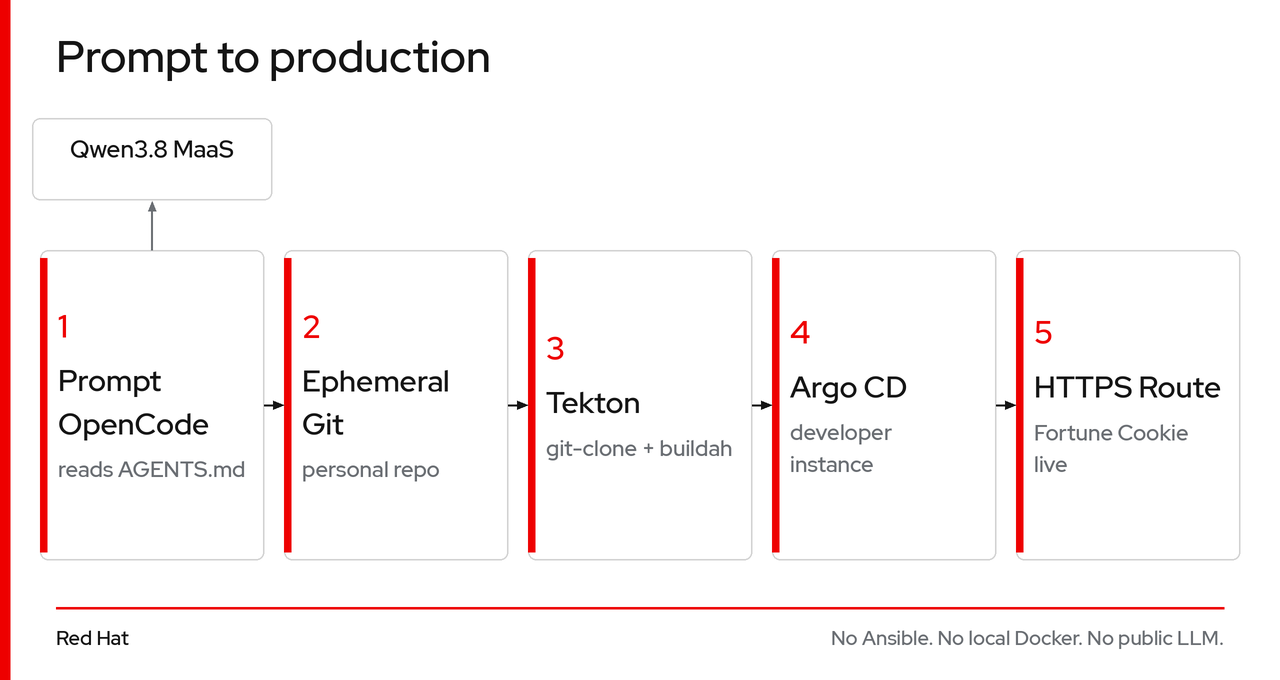
Session 1: Plan
Press Tab until the TUI shows plan, then paste. Stay in this session — do not start a new one (Ctrl+N).
Fortune Cookie in Go: GET / is HTML with a random fortune from at least 10 hard-coded messages.Review the plan. Adjust if needed. The plan is the context for the next prompt.
Session 2: Build and Deploy
Press Tab to build in the same session.
Implement the plan.OpenCode writes the files, compiles, then ships from AGENTS.md. When it is done it should print the app route and the Argo CD console URL. The Argo CD Application must live in ${APP_NAME}-dev (never default).
Checkpoint — the app is live
APP_NAME="${APP_NAME:-fortune-cookie}"

APP_ROUTE=$(oc get route $APP_NAME -n ${APP_NAME}-dev \
  -o jsonpath='{.spec.host}' 2>/dev/null)
ARGOCD_ROUTE=$(oc get route argocd-server -n ${APP_NAME}-dev \
  -o jsonpath='{.spec.host}' 2>/dev/null)

echo "================================================"
echo " App:    https://${APP_ROUTE}"
echo " ArgoCD: https://${ARGOCD_ROUTE}"
echo "================================================"

oc get application $APP_NAME -n ${APP_NAME}-dev \
  -o jsonpath='{.status.sync.status} / {.status.health.status}' && echo

curl -sk https://${APP_ROUTE}/healthz
Expected:
{"status":"ok"}Open both URLs in your browser:
-
The app URL shows a random fortune cookie message
-
The Argo CD console shows your
fortune-cookieApplication in Synced / Healthy — your Argo CD instance, scoped to your project
The model wrote the code; the running app serves a slice of strings.
Session 3: Ship a change
Close the GitOps loop: change the app, push, watch Tekton rebuild, roll the deployment. Still no hand-written kubectl apply for the app.
Start a new OpenCode session in ${PROJECT_SOURCE}. Press Tab to build:
Add 10 more fortunes and show the message in a styled card with 🥠. Then ship it.Wait for OpenCode to confirm the PipelineRun succeeded.
You can watch the build in the OpenShift console: Pipelines → PipelineRuns in the fortune-cookie-build namespace.
APP_NAME="${APP_NAME:-fortune-cookie}"

oc get application $APP_NAME -n ${APP_NAME}-dev \
  -o jsonpath='{.status.sync.status} / {.status.health.status}' && echo

oc rollout status deployment/$APP_NAME -n ${APP_NAME}-dev --timeout=120s

ROUTE=$(oc get route $APP_NAME -n ${APP_NAME}-dev -o jsonpath='{.spec.host}')
echo "https://${ROUTE}"
curl -sk https://${ROUTE}/healthzSynced / HealthyOpen the URL — you should see the cookie emoji 🥠 and the new fortunes.
| Step | Platform action |
|---|---|
|
Updated code on your personal Git repo |
Tekton |
|
|
Pods pull |
➡️ Move on to Lab 2.3: Audit with OpenCode.