Lab 1.4 — Hand the Keys
The GPU is warming Qwen3.8. Your job now is to hand the afternoon developer a launch URL and a short runbook — not a wiki, not Ansible, not a tour of every Kustomize file.
The template is already on GitHub: fjcloud/go-app-template.
|
Estimated time: 10 minutes |
What the developer actually gets
| Path | Why it exists |
|---|---|
|
The only runbook OpenCode reads. Generate |
|
Pins OpenCode to in-cluster Qwen3.8 via MaaS. The API key is |
|
Dev Spaces workspace. Installs the ephemeral Git client. |
|
Golden-path Kustomize. The model applies it; it must not rewrite it (except the Deployment |
There is no scripts/ directory and no Ansible. Qwen3.8 follows AGENTS.md.
Step 1: Read AGENTS.md
Clone only if you want it on disk. On a shared workshop cluster you can also open the file on GitHub. Either way, read it — it is short.
git clone --depth 1 https://github.com/fjcloud/go-app-template
cd go-app-template
wc -l AGENTS.md
cat AGENTS.md
You should see a short file. Notice:
-
Files YOU must generate —
main.go,go.mod,Dockerfilewith an exact two-stage template -
Files already in the repository — do not rewrite
deploy/,pipeline/,gitops/,devfile.yaml, oropencode.json -
Three deploy phases — ephemeral Git → Tekton PipelineRun → Argo CD Application
-
Namespaces —
${APP_NAME}-buildand${APP_NAME}-devonly. Never namespacedefaultfor the app, Argo CD, or the Application.
| Phase | What it does | Typical duration |
|---|---|---|
1. Git |
Create a personal repo on ephemeral Git, commit, and push |
~30s |
2. Image |
|
3–5 min |
3. GitOps |
Point |
2–3 min |
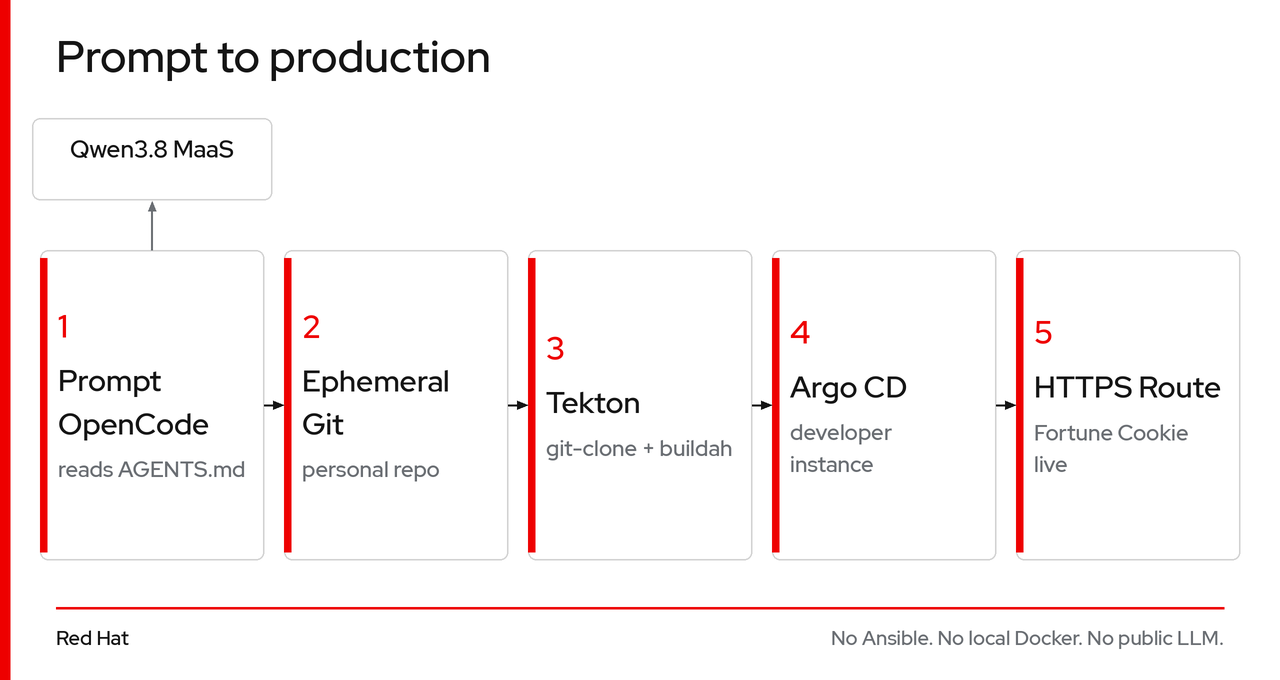
Step 2: Confirm OpenCode is wired to MaaS
OpenCode is injected from the AI tool registry you applied in Lab 1.3. The binary comes from the platform. The model pin is opencode.json in the template — that file wins over ~/.config/opencode.
CHE_NS=$(oc get checluster -A -o jsonpath='{.items[0].metadata.namespace}')

oc get configmap opencode-workspace-config -n "$CHE_NS" \
  -o jsonpath='{.data.opencode\.json}' | python3 -m json.tool
You should see baseURL {env:OPENAI_BASE_URL} (mint + configure-platform.sh set that env to https://maas.<apps-domain>/llm-serving/qwen3/v1), provider/model name Qwen3.8, API id qwen3, limit.context: 262144, and limit.output: 32768.
|
If you are on the shared workshop cluster, the ephemeral Git URL in |
Step 3: Copy the developer launch URL
DEVSPACES_URL=$(oc get checluster -A -o jsonpath='{.items[0].status.cheURL}')
if [[ -z "$DEVSPACES_URL" ]]; then
  DEVSPACES_URL="https://$(oc get route devspaces -n openshift-operators \
    -o jsonpath='{.spec.host}')"
fi
TEMPLATE_URL="https://github.com/fjcloud/go-app-template"

echo "============================================"
echo " Participant workspace URL:"
echo "  $DEVSPACES_URL/#$TEMPLATE_URL?ai-provider=opencodeai/opencode"
echo "============================================"
When a developer opens that URL, Dev Spaces clones the template (including opencode.json), injects the OpenCode binary, installs the ephemeral Git client, and opens VS Code in the browser. They talk to Qwen3.8; AGENTS.md is the runbook.
Act 1 complete
| Component | Status |
|---|---|
GPU node pool (1× A100 80 GB) |
✅ Provisioned on ARO HCP |
Operators + dashboard |
|
Qwen3.8 as Models-as-a-Service |
✅ Gateway + |
Go app template |
✅ Short |
Switch persona — move on to Act 2: first day (Lab 2.1).